Data Retention Policy
Data Retention Policy enables you to configure the retention days for different indexes from the Admin Module. This policy enables you to delete the data which is older than configured number of days from given indices. For rpa-txn-steps* index, it marks the index as closed which is older than configured number of days and for other 4 indices data is deleted in case, data is older than configured number of days.
To perform Data Retention Policy settings:
- Go to Configuration and click Data Retention Policy.
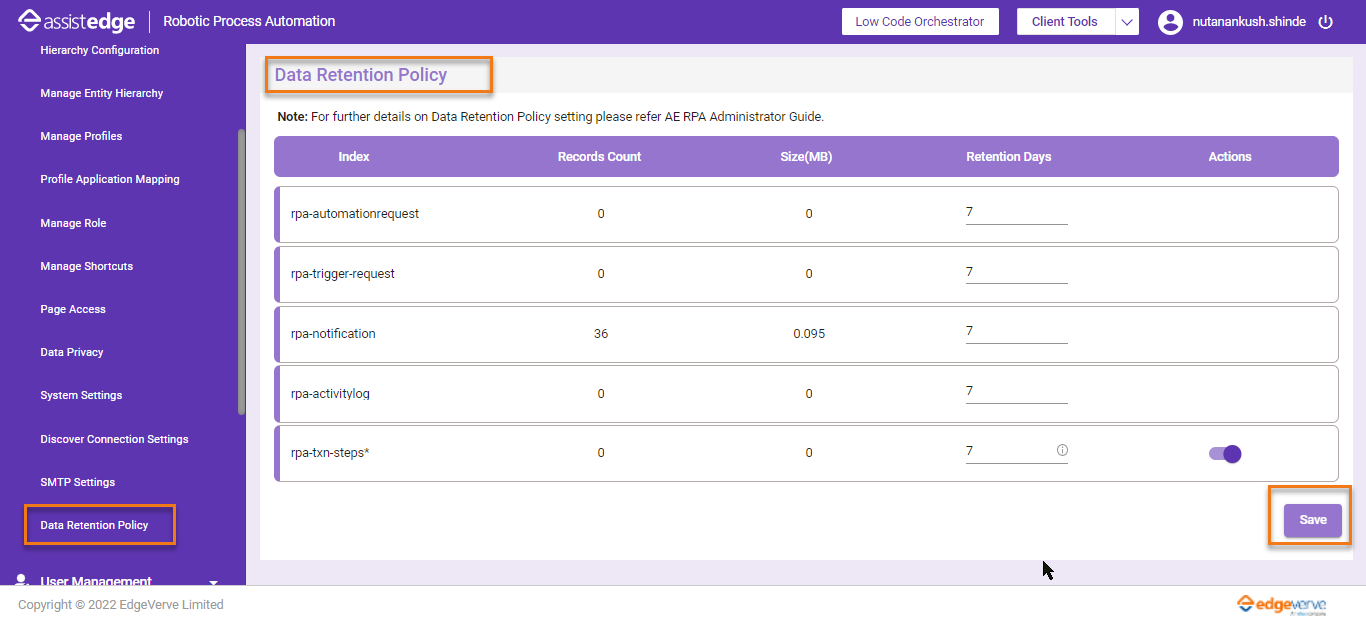
The Data Retention Policy page is displayed. -
In the Retention Days field, enter the number of days for which a document will be live in the index. Upon completion of configured number of days, data is deleted from that index.
-
By default, the configuration of 5 elastic indices is added, 4 of them are enabled.
-
For rpa-txn-steps* index, you can enable or disable this policy with configurable retention days. Ensure that the number of days should be greater or equal to Retention Days of rpa-automationrequest index, else for some processes transaction step details will not be available.
-
-
Once done, click Save.
A message appears as Data Retention policy saved successfully.