Licenses
The Licenses tab provides a detailed view of the license information such as license usage of the customer. In this view, the licenses are not categorized by commercial offering, but instead, they are listed at an individual license level.
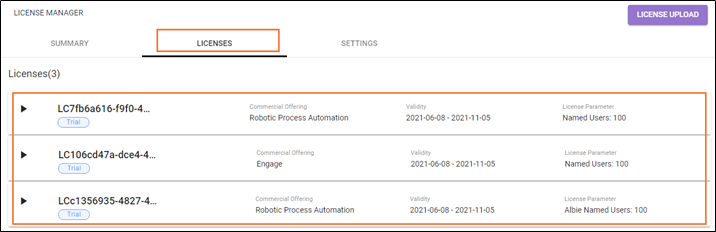
This tab provides information on the license usage of the customer.
If a license is expired, then the validity of the license appears in red signifying the expiry of the license. In case of a perpetual license, the validity field displays Not Applicable as validity end date, but the Valid from date is displayed.
Click the  (Expand) icon to view the associated details of licenses.
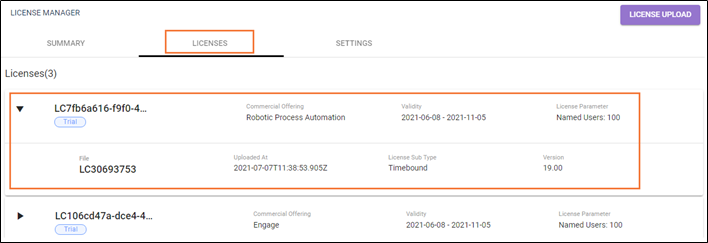
Following is the field description of expand license view associated details.
| Name | Description |
| License ID | Indicates the license ID of logged-in user. TRIAL or Commercial is mentioned below license ID. |
| Commercial Offering | Indicates the type of license such as RPA, Engage and so on. |
| Validity | Indicates the validity period for the license is valid. In case of perpetual license term, the validity is not applicable. |
| License Parameter | Indicates the license parameter such as number of Albie Conc users, number of robots and so on. For RPA license, number of robots, number of users for Attended RPA and Albie users is the license parameter. |
| File | Indicates the license file number. |
| Uploaded At | Indicates the date and time at which the license was uploaded in the License Manager. |
| License Sub Type | Indicates all the type of licenses in possession by the user such as perpetual, and time bound. |
| Version | Displays the Product version for which the license is procured. |
| Valid From | Indicates the start date of license validity. |