Engage Automation Dashboard
Following reports are available in the Automation View:
Automation Process View
- The number of times each process is executed as well as the number of successful, failed, or intervened transactions which can be used to optimize resource planning.
- Average time spent on each process along with execution time and time spent on other activities post search.
- Service level defined against each process and the percentage of requests that are executed within SLA process, so that necessary action can be taken.
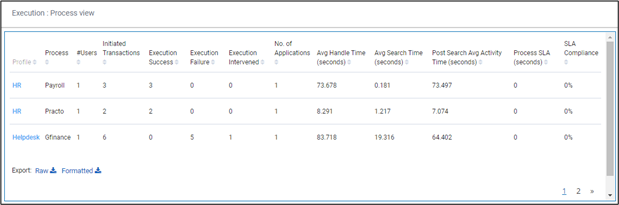
Following table provides the report fields description.
| Field Name | Description |
| Profile | Indicates the name of the profile. |
| Process | Indicates the name of the process. |
| #Users | Indicates the total number of users working on the process. |
| Initiated Transactions | Indicates the total number of transactions initiated in that particular process. |
| Execution Success | Indicates the total number of transactions that were successful in that particular process. |
| Execution Failure | Indicates the total number of transactions that were failed in that particular process. |
| Execution Intervened | Indicates the total number of transactions initiated but could not be completed. |
| No. of Applications | Indicates the total number of applications in which automation is done for a process. |
| Avg Handle Time (seconds) | Indicates the average time spent on all the transactions. |
| Avg Search Time (seconds) | Indicates the average automation time spent across all the transactions. |
| Post Search Avg Activity Time (seconds) | Indicates the time spent on the process, once the search is completed and the next search is started. |
| Process SLA (seconds) | Indicates the expected execution time configured in Studio. |
| SLA Compliance | Indicates the percentage of time a particular automation request was completed and successfully executed within the defined SLA timeline. The process SLA can be defined at the time of deploying a process in the Automation Studio. |
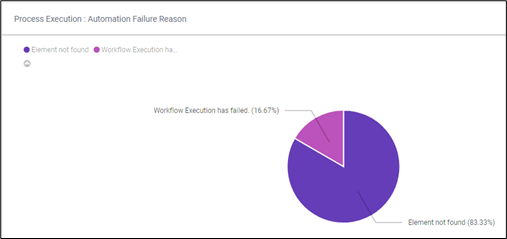
Automation Failure Reason
The percentage of each of the failure reason is shown. This gives an insight on reasons of failure based on their relative contribution improving the performance and quality of automation by addressing key failure reasons.