Customizing Data Masking and Anonymization
Engage comes with features which helps processes to mask and anonymize any data deemed sensitive. This is done by a Data Masking (DM) and Anonymization framework that is built in the product. The built in DM framework helps process designers to mask data related to Credit Card (CC), Email, SSN and any string (which falls in the Default category) by using out of the box available masking patterns. The masking patterns for the built in masking strategy is as follows
- Credit Card – Masks all but last four digits. E.g. 1334-1234-1234-1234 is masked as xxxx-xxxxx-xxxx-1234
- Email – Masks alternate characters in the email address and masks all of domain name. E.g. sony@gmail.com is masked as sxnx@xxxx.com
- SSN – masks all but last four characters. E.g. - 123-12-1234 is masked as xxx-xx-1234
- Default – masks alternate characters. E.g. Hello, world is masked as Hxlx0x xoxlx. Note: space is treated as a character and is masked as well.
As is the wont of frameworks, DM is flexible enough to add new masking strategies or even modify existing strategy patterns or even to replace the masking character (‘x’). Here is a guide how to go about implementing custom masking framework.
Customize Data Masking by implementing the interface
DM in AE is implemented using an interface IDataMaskAdapter. The library that implements this is placed in \\Plugins\DataMasking\ folder. This is applicable to Studio, Engage and robot. Customized library needs do the same. Implement the interface and replace existing library in the above mentioned folder.
To implement custom DM, implement the IDataMaskAdapter available in Utilities.Interface library. A reference to MaskingPattern object available in Utilities.Models.Studio also needs to be added.
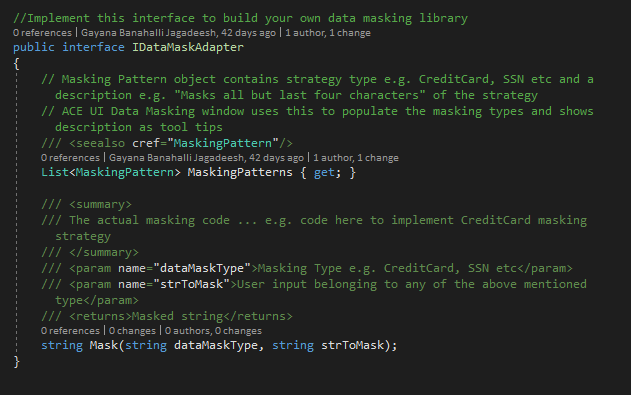
Find attached an implementation of the above interface.
|
using System; namespace CustomMaskingUsingInterface public const string CreditCard = "CC"; public List<MaskingPattern> MaskingPatterns { get { return _maskingPatterns; } } public CustomMasking() void AddDataMaskingPatterns() _maskingPatterns.Add( new MaskingPattern void AddMaskingStrategies() _dataMaskStrategies.Add(CreditCard, new CCMasking()); public string Mask(string dataMaskType, string strToMask) => //Creating a abstract class which inherits IMask interface //Mask credit card var unMask = ccNumber.Substring(ccNumber.Length - 4, 4);//get last four digits for (int i = 0; i < ccNumber.Length; i++) //Mask Email var name = new DefaultMask().Mask(email.Substring(0, indexofat)); //output abc //Default masking. i.e alternative character masking //SSN Masking if (!Regex.IsMatch(ssn, ssnPattern)) throw new ArgumentException($"Invalid SSN format {ssn}"); var toMask = ssn.Substring(0, 7); StringBuilder maskedStr = new StringBuilder(); for (int i = 0; i < toMask.Length; i++) return maskedStr.ToString() + unMask; //Phone Number Masking var mask = phNumber.Substring(3, 4);//get mid four digits for (int i = 0; i < mask.Length; i++) |
Customize Data Masking extending the existing implementation
Class diagram of the default implementation.
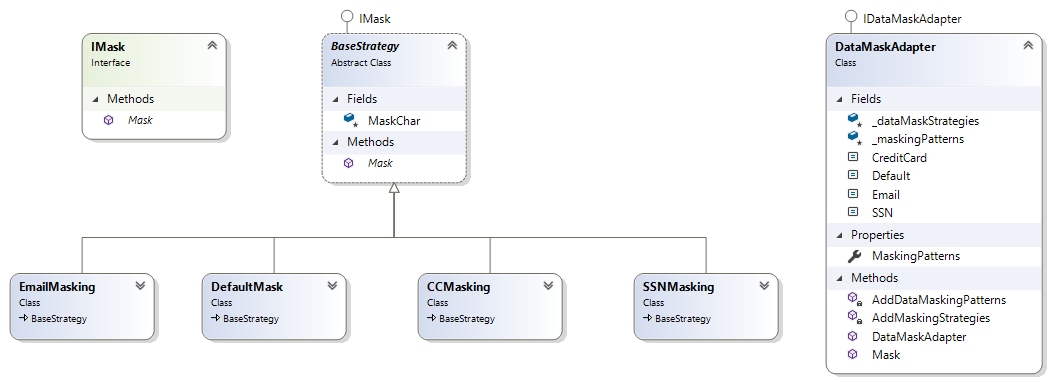
Inherit DataMaskAdapter and override existing properties/methods to extend the custom implementation. Add new strategies to _dataMaskStrategies and masking patterns to _maskingPatterns dictionaries. Call the new implementations from the Mask method. Custom written newer strategies need not follow the existing approach where they implement IMask interface.
Find a sample attached which adds a new Phone Number masking to the existing strategies.
|
using EV.AE.DataMaskingPlugin; namespace CustomMaskingUsingAdapter base.MaskChar = '*'; for (int i = 0; i < mask.Length; i++) |
|
NOTE: |
Before replacing the existing library, move it into another folder outside plugins. This way application will be able to load modified as well as existing masking patterns. |
Customize Anonymization by implementing the interface
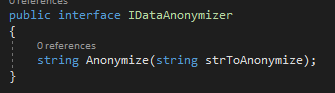
Data anonymization in Engage is implemented using an interface IDataAnonymizer. The library that implements this is placed in \\Plugins\ DataAnonymizer\ folder. This is applicable to AutomationStudio, Engage and robot. Customized library needs do the same. Implement the interface and replace existing library in the above mentioned folder. The library shipped anonymizes the input using SHA512 algorithm.
To implement custom Data Anonymization, implement the IDataAnonymizer available in Utilities.Interface library.