Proctor
You can edit the configuration settings related to Proctor.
To modify the Proctor settings:
- Login to Admin Module > Control Tower.
- Click the
 (Runtime Configuration) icon. The Runtime Configuration page appears, go to Proctor tab.
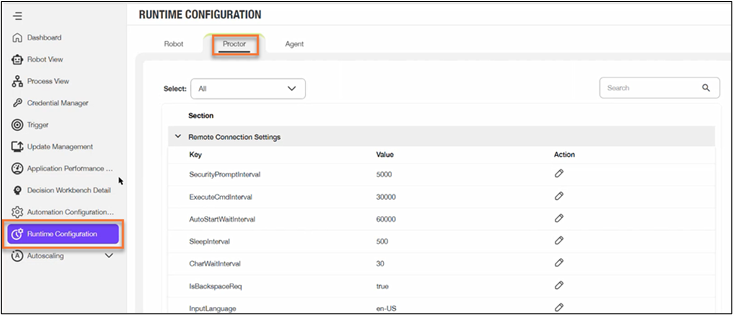
- Click the
 to expand the required section. The associated Key and Value fields are displayed. The table below lists the Key description for each settings.
 - Click the
 edit icon of the Key whose value you want to modify.
| Key | Description |
| Proctor | |
| SecurityPromptInterval | Enables you to specify the time interval in milli seconds for the security prompt popup. For example, 5000. |
| LoginInterval | Enables you to specify the time interval in milli seconds for the application login. For example, 40000. |
| ExecuteCmdInterval | Enables you to specify the time interval in milli seconds for executing CMD. For example, 30000. |
| AutoStartWaitInterval | Enables you to specify the time interval in milli seconds to wait before the auto start. For example, 60000. |
| SleepInterval | Enables you to specify the sleep time interval in milli seconds. For example, 60. |
| CharWaitInterval | Enables you to specify the wait interval for char. For example, 30. |
| IsBackspaceReq |
Enables you to specify if back space is required or not. Possible values are:
|
| IgnoreCertificate |
Enables you to choose if you want to ignore the certificates. Possible values are:
|
| InputLanguage |
Enables you to specify the input language.
|
5. Make the necessary changes and click Save to save the changes.